AIThis post was created with the assistance of artificial intelligence (AI).

TL;DR

Smart home security cameras let you check your home remotely, receive activity alerts, and review footage, but the useful details depend on placement, connectivity, detection, and recording options. Match the camera to its location, confirm what happens during internet or power outages, compare subscription costs, and set privacy controls before you install it.

A sharp 4K camera can still miss the delivery driver if it points at the wrong patch of driveway. Choosing smart home security cameras means thinking beyond pixels: you need to know what the camera sees, when it records, how footage is stored, and what happens when the Wi-Fi drops. This guide explains the tradeoffs in plain language, with practical examples for entrances, driveways, and indoor spaces. You’ll learn how to compare camera types, cut down noisy alerts, protect household privacy, and spot ongoing costs before they surprise you.
At a glance
Smart Home Security Cameras: A Practical Buying Guide
Key insight
A camera’s stated resolution alone cannot tell you whether it will capture useful evidence: field of view, lighting, compression, placement, and the way it records all affect the footage you can actu…
Key takeaways
1

Aim each camera at the approach you need to see; a high resolution cannot compensate for a poor angle or bad lighting.

2

Check the camera’s weather rating, power needs, and charging demands for its exact location.

3

Confirm recording mode, retention, storage costs, and behavior during internet or power outages before buying.

4

Use activity zones and review alerts for several days to reduce nuisance notifications.

5

Set privacy zones, secure the account with a unique password and multifactor authentication, and check local rules for audio or indoor monitoring.

Before you orderOffer from Amazon

Get home appliances delivered free with Prime

  • Fast, free delivery on millions of items
  • Prime Video, Amazon Music and more included
  • Member-only deals all year
Start your free Prime trial Free trial for eligible customers · Cancel anytime
As an affiliate, we earn on qualifying purchases.

What smart cameras can do for your home—and where they fall short

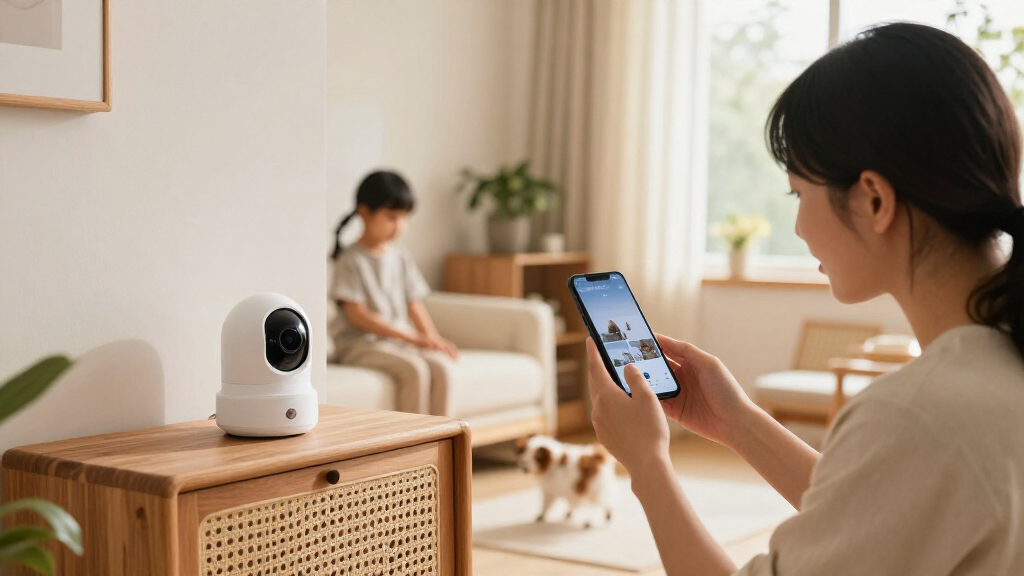
Smart home security cameras let you check a home remotely, receive motion or sound alerts, and review recorded footage. Some work as standalone devices; others link to doorbells, lights, alarms, locks, or voice assistants. Their value comes from fitting those jobs to your home, not from simply buying the highest resolution. Imagine you’re at work when a package arrives. A well-placed camera might show the courier approaching the porch and tell you when the box was left; a camera aimed too high may show only a hat and a slice of sky. Detection software can label activity as a person, pet, vehicle, or package, but performance varies with lighting, weather, placement, and the model’s software. A squirrel in the lower corner may still trigger an alert. Think of a camera as a window with a doorbell attached: it can help you see what’s happening, but it can’t make a decision for you. It may miss events outside its view, lose remote access when the connection fails, or record only short clips. Cameras let people respond to activity sooner, while a broader system might also turn on lights or sound an alarm. Check exactly which actions your model supports before counting on that setup.

Products Worth Considering

Samsung 65-Inch S90H OLED 4K Smart TV Bundle with HW-B630F Soundbar, Subwoofer, and Screen Cleaner (2026)

Samsung 65-Inch S90H OLED 4K Smart TV Bundle with HW-B630F Soundbar, Subwoofer, and Screen Cleaner (2026)

As an affiliate, we earn on qualifying purchases.

Choose a camera that fits the spot you need to watch

Choose a camera by matching its power, weather rating, view, and night performance to its location. A camera for a sheltered porch has different demands from one watching a long, exposed driveway. Resolution matters, but lens quality, field of view, lighting, compression, and mounting angle shape what the footage can show. These factors work together: a wide lens can cover more ground, but spreads the same image detail across a larger area. A camera with a narrower view may show a face more clearly near the door, yet fail to capture someone approaching from the side. For example, a wide view may cover the front steps and gate in one frame, but a face at the far edge could look small. A narrower view may capture more detail at the door while missing someone approaching from the side. This affects what you can usefully review after an event: identifying that someone was present is different from seeing enough detail to recognize them. Infrared night vision produces black-and-white footage; a spotlight can produce color night footage and make details easier to see, though the light may draw attention and could disturb neighbors.
Camera choiceGood fitTradeoff to check
Wired outdoorFrequent recording at a fixed entranceRequires suitable wiring and weather rating
Battery outdoorA spot without convenient powerFrequent activity or cold weather can shorten time between charges
Indoor cameraChecking a room or shared indoor areaMay not include the privacy controls you want
Spotlight cameraA dark approach where color night footage helpsLight can be conspicuous to neighbors or visitors
Power choice affects how consistently a camera can capture activity. A battery model can go where wiring cannot, but motion-triggered recording and regular recharging may shape how much it records and how often you maintain it. Some models work with solar-assisted power, but performance depends on sunlight and the device’s requirements. For electrical installation, switch power off before any work on the circuit and use suitable protective equipment. Hire a licensed professional if the job involves wiring or you’re unsure; follow local code and permit requirements. A temporary camera mount can help you test the view before making a permanent installation. Testing first matters because moving the camera a little can change whether faces are visible, the approach is covered, and windows stay out of frame.

Cut useless alerts without missing the activity you care about

Smart home security cameras send more useful alerts when you aim them at meaningful approaches and tune detection around real activity. Activity zones and sensitivity settings can reduce notifications from a busy street, waving tree branches, or pets crossing the room. They can help, but they don’t make detection perfect. If every passing car triggers an alert, you may start ignoring notifications; if sensitivity is too low, the event you wanted to notice may not register. The goal is a manageable stream of alerts that still includes the activity you care about. Suppose a porch camera sends 40 alerts during a windy afternoon because leaves fill the lower half of the frame. You could narrow its activity zone to the walkway and steps, then lower sensitivity until ordinary leaf movement stops triggering alerts. If it also watches a gate, leave that part in the zone and test whether a person walking through still gets detected. Check the result after dark too: headlights and shadows can change what the camera sees. Adjusting one setting at a time helps you understand the cause of a change. If you alter the zone and sensitivity together, a missed alert may leave you unsure which adjustment caused it. A simple setup routine works better than setting every sensitivity slider to maximum:
  1. Mount and test the view from the app, checking for faces and useful approaches at a normal walking distance.
  2. Set activity zones around entrances, gates, or parking areas you want to watch.
  3. Choose alert types, such as people or vehicles, if your model offers them.
  4. Review a few days of alerts and adjust zones or sensitivity based on actual false alarms and missed events.
A delivery on a busy pavement makes a good test case: if the camera alerts on every passerby, the zone likely needs adjustment. If it stops alerting on a person walking to your door, the zone or sensitivity may be too restrictive. Features and labels vary by model and may require a subscription. Treat a “person” or “package” label as a helpful clue, not a guarantee.

Compare storage and outage behavior before paying for a camera

Compare storage by checking where footage goes, how long it stays there, and what records during a connection outage. Cloud plans may offer remote video history, while local storage can avoid some recurring fees. Either way, the recording mode matters: event clips take less space than continuous high-resolution video. These choices affect whether footage is available when you need it. A plan that keeps clips for only a short period may erase an event before you realize it matters, while longer retention usually means paying more or managing more storage. Picture a camera watching a quiet side door. Event recording may preserve short clips around detected movement, which could be enough for occasional visits. A camera covering a busy shared entrance may record constantly and use far more storage. A wired camera might support continuous recording, while many battery models save short, motion-triggered clips to conserve power. Event clips use less power and storage, but they depend on the camera detecting activity; if it misses the motion, there may be no clip to review. Confirm the mode and retention period in the current product details.
Storage approachWhat to checkWhat can go wrong
Cloud subscriptionMonthly cost, clip history, detection features, and retentionInternet loss can affect remote access or uploads
Memory card or base stationCapacity, recording mode, and access during outagesDevice theft or damage can take the footage with it
Hybrid storageWhich features need cloud access and which record locallyCapabilities and plan terms differ by model
Before buying, check how much storage your chosen recording mode needs; resolution, compression, and activity all affect it. Ask what the camera does when Wi-Fi or power fails. Some cameras keep recording locally during internet outages, but others lose that function; a wired camera may stop during a power cut unless backed up. Local recording can preserve footage without internet, but it may not let you view it remotely until service returns. A subscription-free price can still involve hardware costs or limits on video history. Compare the cost with the retention and outage behavior you actually need, rather than assuming that “local” or “cloud” alone guarantees access.

Protect privacy while keeping the view useful

A camera protects your home best when it captures useful approaches without recording more of your household or neighbors than necessary. Start by aiming it at your entrance or driveway, then check whether windows, neighboring yards, or public areas enter the frame. Privacy zones may let you block selected parts of the image, though the feature varies by camera. Narrowing the view can reduce incidental recording, but too much masking can hide a walkway or a person’s approach. Review the live view from the positions visitors would use so you can balance coverage with privacy. For example, a door camera could cover your front path while a privacy zone masks the neighbor’s window across the lane. Inside, a camera pointed at a shared living area may capture visitors and family members throughout the day. That creates a different privacy tradeoff from an outdoor entrance: indoor footage can reveal routines and conversations, even when nobody is home. Some devices offer a physical shutter, scheduled privacy mode, or microphone control; check the settings and test them instead of assuming the camera is private when idle. Secure the account that controls the footage. Use a unique password, turn on multifactor authentication where available, keep the camera and app updated, and review the manufacturer’s policies on encryption, updates, and handling account data. These measures address different risks: a unique password limits damage from reused credentials, multifactor authentication adds a second check at sign-in, and updates can fix known software weaknesses. No connected device is risk-free, but these steps make unauthorized access harder. Laws and expectations for recording guests, employees, or childcare providers vary by location and situation. Audio recording can face stricter rules than video, so check local requirements and tell people where appropriate. A brief sign or clear conversation can prevent a camera from becoming a source of mistrust.

Add up the full cost and check what smart home features really work

The cost of a camera includes more than its purchase price: count subscriptions, storage equipment, battery replacements, and fees for advanced detection or longer video history. A low-cost camera can become expensive if cloud clips require a monthly plan; a pricier model may offer local recording that fits your needs better. Compare the total over the period you expect to use it. This makes the tradeoff clearer: a recurring fee can buy convenient remote history and extra detection, while local storage may cost more upfront and require you to manage the equipment yourself. Say you’re choosing between a battery camera and a wired model for a front entrance. The battery camera may save installation work, but a busy walkway could mean frequent charging. The wired camera may support steadier power or continuous recording, but installation could involve suitable wiring and a professional. Frequent charging is more than an inconvenience if it means the camera is offline during a busy period; wiring is more than an installation cost if it enables recording modes the battery model cannot sustain. The right choice depends on the location, recording mode, and how much maintenance you’re willing to handle. Smart home security can also mean linking cameras with lights, doorbells, or voice assistants. Compatibility differs by model and platform: one camera might show a live feed on a smart display but not trigger a light or share every detection category. Confirm the specific functions you want before buying, rather than relying on a platform logo. AI-based detection, integrated lights, sirens, and solar-assisted power are common selling points, but availability and subscription terms change. Check current specifications. If you only need a porch alert and a few days of clips, paying for constant recording and advanced recognition may add cost without adding much value. If you need footage for longer periods or want an alert to trigger another device, those paid features may solve a real need; compare that benefit with the recurring cost.

Frequently Asked Questions

Do smart home security cameras work without Wi-Fi?

Live remote viewing and cloud features generally need an internet connection. Some cameras record locally during an outage, but behavior depends on the model and setup, so check before buying.

Do I need a subscription to use a smart camera?

Not always. Some cameras offer live viewing and local recording without a plan, while cloud history, advanced detection, or longer video retention may require a subscription.

Can a smart camera record continuously?

Some wired models support continuous recording, while many battery cameras save short clips after detecting activity. Check the recording mode, storage needs, and plan limits for the exact model.

Are smart home security cameras secure from hackers?

No connected device is risk-free. Use a strong, unique password, turn on multifactor authentication where available, keep software updated, and review the manufacturer’s security and update policies.

Where should I place a camera outside?

Entrances, driveways, and shared exterior approaches are common locations. Aim to capture useful activity while avoiding unnecessary views into neighbors’ homes or other private spaces.

Will a camera recognize people, pets, or packages reliably?

Some models offer those detection categories, but features can depend on the device, region, software, or subscription. Detection can misclassify events, so treat labels as alerts to review rather than certain identification.

Conclusion

Choose a camera for the view you need, then check its power, recording, privacy, and ongoing costs before you mount it. Test the angle and alerts during both day and night, and make sure you know what the device does when the network drops. A useful camera should leave you with a clear answer when you open the app—not a wall of blurry clips and leaf alerts. Set it up carefully, and your front door can feel less like a blind spot and more like a place you understand.
You May Also Like

I Tried A $99 Plug That Promises To Track Your Car And Send Help When Needed — Without Selling Your Data

The $99 Miles Plug tracks trips and vehicle health, with roadside and accident-response services sold through prepaid memberships.

Smart Home Devices For Dorm Rooms: A Back to school Guide

Discover the best smart home gadgets for dorm rooms. Stay secure, save energy, and boost convenience with easy-to-use, budget-friendly tech.

Trying to replace an old broken Mortise lock; can’t find good info on what is needed to replace it?

Homeowners struggle to find guidance on replacing a broken mortise lock, highlighting a knowledge gap in DIY lock replacement procedures.

Department Of Homeland Security Surges In Global Coverage

Search interest in the Department of Homeland Security has surged internationally, with media coverage increasing significantly in recent days, though the reasons remain unconfirmed.