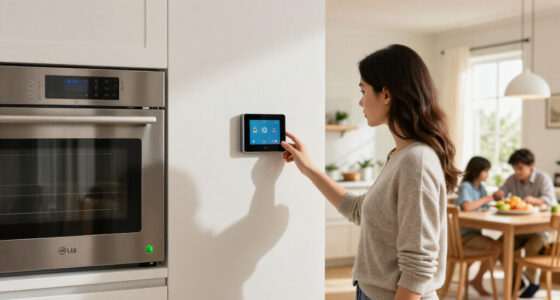
Amazon Alexa and Google Home are often compared because both can control lights, plugs, thermostats, and other connected devices through voice commands, yet they suit different households. Alexa’s main advantage is the breadth of compatible products and the flexibility of its routines. Google Home’s strength is its close fit with services such as Google Calendar, YouTube, and Google’s search ecosystem. For a home built around a wide mix of smart devices, Alexa is usually the safer starting point; for a household already organized around Google accounts and services, Google Home may feel more natural.

Get home appliances delivered free with Prime
- Fast, free delivery on millions of items
- Prime Video, Amazon Music and more included
- Member-only deals all year

Echo Hub (8") – Redesigned smart home control panel with customizable dashboard and Alexa+
- ✔ Display: 8-inch touchscreen, 1280 × 800
- ✔ Audio: Two top-ported full-range speakers with stereo playback
- ✔ Wi-Fi: Dual-band 802.11a/b/g/n/ac
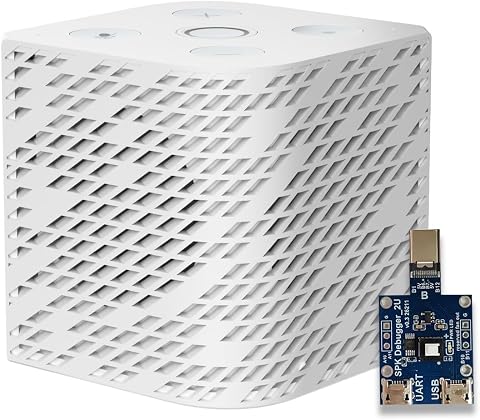
Third Reality Voice/Music Assistant Dev Edition
- ✔ Processor: Quad-core ARM A53
- ✔ Memory: 256 MB RAM
- ✔ Storage: 512 MB flash

Amazon Echo Show 5 Smart Display, Charcoal
- ✔ Display: 5.5-inch touchscreen
- ✔ Camera: 2 MP with built-in shutter
- ✔ Speaker: 1.75-inch full-range speaker
The practical choice also depends on privacy preferences, how much setup you want to do, and whether you are buying a speaker or building a larger smart home. Both platforms can handle everyday commands, but neither guarantees that every device or feature will work equally well across every country, model, or subscription tier. The comparisons below focus on the ecosystem experience, so check compatibility for the specific products you own before choosing.
At a Glance
| Criteria | Amazon Alexa | Google Home | Winner |
|---|---|---|---|
| Smart home compatibility | Broad compatibility across many brands and device categories; check specific product support. | Works with many popular smart home brands; compatibility depends on product, setup, and region. | A |
| Routines and automation | Flexible routines, triggers, and device combinations, with capabilities varying by device and region. | Supports household routines and automations; some advanced options depend on devices and app features. | A |
| Voice questions and services | Strong Amazon services and shopping links; general answers can vary by request. | Strong fit with Google services and conversational search; features may vary by region and account. | B |
| Setup and everyday use | Accessible for common commands; Alexa-enabled products are widely available. | Straightforward for Google account users; controls are centered on the Google Home app. | Depends |
| Privacy and control | Offers privacy settings and recording controls; review account settings and device options. | Offers account and voice activity controls; review settings and device options. | Depends |
| Speaker and display choice | Wide selection of Echo speakers and displays across price points. | Nest speakers and displays provide a focused range of options; availability differs by market. | A |
| Value and ecosystem cost | Entry options are inexpensive; added devices or subscriptions may increase total cost. | Can be good value if the household already uses Google services and compatible devices. | Depends |
Echo Hub (8") – Redesigned smart home control panel with customizable dashboard and Alexa+
For a household that wants a central place to see and manage connected devices, the Echo Hub is the most complete voice-assistant choice here. Its 8-inch touch screen can be organized into a personalized dashboard, so frequently used controls are visible without having to remember a voice command or open a phone app. Alexa+ adds voice routines, Ring camera event summaries, and multi-device mode control, bringing spoken interaction and hands-on control together.Its broad protocol support is the main distinction from the Echo Show 5: the Hub lists Zigbee, Thread, Matter, Bluetooth LE, Wi-Fi, and Sidewalk controller support, which can make it a more capable anchor for a mixed-device setup. The Echo Show 5 remains more appropriate when you want a small display you can move between rooms, but it does not present the same specified range of smart home protocols. Third Reality, meanwhile, is the more direct fit for Home Assistant users who want a dedicated voice endpoint rather than an Alexa-centered panel.The Hub’s strength comes with a clear placement tradeoff. It is designed to be mounted or stationed as a fixed household control point, not carried around. Some installations may also need a separately purchased stand or PoE converter, depending on where and how the panel will be powered. Its speakers support stereo playback, but this is primarily a control interface, so buyers seeking a compact display for calls and casual media may find the Echo Show 5 a more natural room device.
Pros:
- Personalizable 8-inch dashboard keeps frequent device controls visible.
- Support for Wi-Fi, Zigbee, Thread, Matter, Bluetooth LE, and Sidewalk controller.
- Alexa+ adds voice routines, Ring camera summaries, and multi-device mode control.
- Wall mounting and compatible PoE power provide installation flexibility.
Cons:
- Designed as a fixed panel rather than a portable room-to-room assistant.
- A tabletop stand or PoE converter may be an additional purchase for some setups.
- Some Bluetooth speaker features, including HFP and PIN-code pairing, are unsupported.
Best for: Households that want a customizable, wall-mounted or countertop Alexa dashboard to control a varied mix of compatible smart home devices.
Not ideal for: People who need a portable assistant, want Home Assistant as their primary voice ecosystem, or want a small display mainly for video calls and casual room use.
Bottom line: Choose the Echo Hub when you want Alexa voice control paired with a dedicated, customizable command center for a broad smart home setup.
“Choose the Echo Hub when you want Alexa voice control paired with a dedicated, customizable command center for a broad smart home setup.”
Third Reality Voice/Music Assistant Dev Edition
The Third Reality Voice/Music Assistant Dev Edition fills a narrower but valuable role: it brings Home Assistant voice interaction and Music Assistant playback together in a small dedicated speaker. Both assistants come preloaded, so it is oriented toward people who already want a Home Assistant-centered setup and appreciate a device that can serve as a voice endpoint without adding a larger screen. Its dual digital microphones support wake-word or button activation, and the 3 W speaker can provide local text-to-speech and music playback.Compared with the Echo Hub, this is a more focused device rather than a broad household dashboard. It does not offer the Hub’s touch controls or listed support for Zigbee, Thread, and Matter as a hub. Compared with the Echo Show 5, it also gives up a display and camera, but gains a Linux-based platform and an explicit Home Assistant and Music Assistant orientation. That makes it a better match for a hands-on Home Assistant household than for someone looking for an all-purpose Alexa screen.The compact square enclosure is easy to place, although its small 3 W speaker is better understood as a nearby voice and audio endpoint than a room-filling music system. Connectivity is limited to 2.4 GHz Wi-Fi, with no Bluetooth or Ethernet option listed. Its 512 MB of flash storage and 256 MB of RAM also signal a constrained development platform; buyers should choose it for its preloaded assistant role and lightweight Linux flexibility, not assume it can accommodate extensive extra software.
Pros:
- Ships with Home Assistant Voice Assistant and Music Assistant preloaded.
- Dual digital microphones support wake-word or button activation.
- Built-in speaker handles local text-to-speech and nearby audio playback.
- Linux platform and quad-core ARM processor suit development-oriented users.
Cons:
- 2.4 GHz Wi-Fi is the only listed network connection; Bluetooth and Ethernet are absent.
- 512 MB flash storage limits room for additional software.
- Small 3 W speaker is less suited to louder or room-filling playback.
Best for: Home Assistant users who want a compact, dedicated voice and audio endpoint with Home Assistant Voice and Music Assistant ready to use.
Not ideal for: Buyers who want a visual dashboard, broad built-in smart home radio support, louder room audio, or a plug-and-play Alexa experience.
Bottom line: Choose Third Reality when Home Assistant is your center of gravity and you want a compact voice endpoint rather than a display-led assistant.
“Choose Third Reality when Home Assistant is your center of gravity and you want a compact voice endpoint rather than a display-led assistant.”
Amazon Echo Show 5 Smart Display, Charcoal
The Echo Show 5 is the easiest fit when you want Alexa nearby in a bedroom, kitchen, or other small space without giving a wall a permanent control panel. Its 5.5-inch touchscreen puts basic information and media in view, while Alexa voice control can manage compatible smart home devices. A 2 MP camera adds video calls and viewing of compatible cameras, giving it a room-oriented role that neither the audio-only Third Reality speaker nor the fixed Echo Hub serves in the same way.Against the Echo Hub, the Show 5 is smaller and more adaptable as a personal room display, but its screen offers less space for a broad smart home dashboard. The Hub is the stronger pick when device controls and protocol breadth are the priority. Against Third Reality, the Show 5 trades Home Assistant-specific positioning for the familiar Alexa display experience, with a camera and touchscreen in place of the Third Reality unit’s preloaded Home Assistant and Music Assistant setup.Privacy is a practical consideration for a display with a camera: the Show 5 includes a built-in camera shutter and a button that turns off the microphone and camera. Its compact full-range speaker is suited to ordinary room listening, but the listed product details do not describe the same breadth of smart home protocols as the Echo Hub. Some skills and services may also require a subscription or other fees, and Bluetooth speakers that require PIN codes are not supported. We would choose it for a modest Alexa screen, not as the most capable central controller in this group.
Pros:
- Compact 5.5-inch screen presents information and media in a small footprint.
- 2 MP camera supports video calls and viewing compatible cameras.
- Camera shutter and microphone/camera off button offer direct privacy controls.
- Recycled materials are used in the fabric and aluminum components, with recyclable packaging.
Cons:
- Smaller screen is less useful than the Echo Hub for a wide household device dashboard.
- Some skills and services may require subscriptions or other fees.
- Bluetooth speakers requiring PIN-code pairing are unsupported.
Best for: Alexa users who want a small-screen assistant for a bedside table or countertop, with video calls and compatible camera viewing.
Not ideal for: People who need a large, glanceable smart home dashboard, Home Assistant-first integration, or the broad protocol support specified for the Echo Hub.
Bottom line: Choose the Echo Show 5 when a compact Alexa display with camera features matters more than a full-size smart home control panel.
“Choose the Echo Show 5 when a compact Alexa display with camera features matters more than a full-size smart home control panel.”
As an Amazon Associate we earn from qualifying purchases.
Key Differences
The clearest difference is breadth versus ecosystem fit. Alexa has a wider spread of compatible smart home products and Echo hardware, which makes it a practical choice when a household is mixing brands or expects to add devices over time. Google Home can control many popular products too, but it is more compelling when household calendars, video, search, and other everyday tasks already run through Google. The compatibility gap matters most before purchase: verify the exact model and required app support rather than relying on a brand name alone.
For automation, Alexa tends to give users more room to combine triggers and actions, while Google Home offers a capable set of routines that may be sufficient for ordinary schedules and voice commands. Google is usually the more comfortable assistant for people who ask varied informational questions or use Google services throughout the day. Neither is a universal winner for privacy or value: both collect voice interactions under account settings, and the better deal depends on which devices and services a household already owns. A low-cost speaker is only good value if it fits the home you plan to build.
Detailed Comparison
Smart home compatibility (Amazon Alexa wins — moderate)
Alexa wins; the gap is moderate. Amazon’s ecosystem spans a particularly broad range of smart home products and Echo models. That breadth helps when a household has devices from several manufacturers or wants more options at different prices. Google Home supports many widely used brands as well, so a home built around a handful of popular products may see little practical difference. In either case, confirm that the exact device model supports the platform and features you need.
Routines and automation (Amazon Alexa wins — moderate)
Alexa wins for flexibility; the gap is moderate. Alexa routines can combine supported triggers and actions across compatible devices, which gives tinkerers more room to tailor household behavior. Google Home also supports routines for common uses such as scheduled actions and voice-triggered scenes. If you only need lights to turn on at a set time or a single command to start a scene, the difference may be minor. More elaborate setups favor Alexa, though the available triggers depend on your devices and region.
Voice questions and services (Google Home wins — moderate)
Google Home wins for Google-centered households; the gap is moderate. Google’s search and account services make it a natural choice for people who ask varied questions, use Google Calendar, or cast YouTube content. Alexa has its own useful services and is well placed for Amazon shopping and compatible Echo features. The day-to-day gap depends on the questions and services your household uses; compare the specific features you rely on, since availability can differ by country and account.
Setup and everyday use (minor difference)
It depends; the gap is minor for basic commands. Both platforms can handle common requests such as switching a compatible light on or setting a timer. Google Home may feel simpler to someone already signed into Google services, while Alexa’s many device options can make it easier to find hardware suited to a particular budget or room. The bigger source of friction is often initial device setup and brand-specific apps, rather than the assistant itself. Households with mixed phones and accounts should consider who will manage the system.
Privacy and control (moderate difference)
Neither has a clear overall win; the gap depends on personal settings and tolerance. Both ecosystems offer controls for managing voice activity, recordings, and account data, but the specific controls and defaults can change. People who are uncomfortable with a voice assistant in shared spaces should consider whether they will use mute controls, disable features, or avoid placing a speaker in private rooms. Read the current settings for the account and device you plan to use; brand-level assumptions alone do not establish which will feel more private.
Speaker and display choice (Amazon Alexa wins — moderate)
Alexa wins on breadth; the gap is moderate. The Echo family covers a wide variety of speaker and display formats and price points, making it easier to match a device to a kitchen, bedroom, or shared area. Google’s Nest range covers common speaker and display needs, but options and availability vary by market. Sound quality and screen size depend on the exact model, so compare the individual hardware if music, video, or calls matter more than ecosystem breadth.
Value and ecosystem cost (minor difference)
It depends; the gap is minor until you add services or devices. Entry-level speakers from either ecosystem can be affordable, but the speaker price is only one part of the cost. A household may need compatible lights, hubs, subscriptions, or replacement devices to get the experience it expects. Alexa’s wider product selection can help shoppers find lower-cost compatible hardware; Google Home can be the better value when existing accounts and devices already fit. Pay extra only for a feature or service you will use regularly.
Amazon Alexa: Pros and Cons
Pros:
- Broad selection of compatible smart home products and Echo devices.
- Flexible routines can suit more involved household automations.
- Hardware choices span a range of formats and budgets.
Cons:
- More options and integrations can add setup complexity.
- Amazon shopping and service links may not suit every household.
- Compatibility and features still vary by device, market, and account.
Google Home: Pros and Cons
Pros:
- Natural fit for households that use Google services and accounts.
- Strong search and information experience for many everyday questions.
- Capable routines for common household tasks.
Cons:
- Hardware range is narrower than the Echo family in many markets.
- Advanced smart home use may offer less flexibility than Alexa routines.
- Some features depend on region, account, and compatible devices.
Who Should Choose What
Choose Amazon Alexa if:
- You plan to connect products from several smart home brands and want a broad choice of compatible devices.
- You expect to build custom routines that combine multiple supported devices or triggers.
- You want to compare Echo speakers and displays across a wide range of formats and prices.
Choose Google Home if:
- Your household already relies on Google Calendar, YouTube, and Google accounts.
- You often ask spoken questions and want an assistant that fits into Google services.
- Your current smart home devices already support Google Home and your needs are mostly routine commands.
Skip both if: Skip both if you do not want a microphone-enabled assistant in your living space, or if your essential devices do not support either platform. A local-control hub or manual controls may suit you better.
Value for Money
Paying more is worthwhile only when it buys a feature you will use. For a basic speaker that answers simple commands, the lowest-cost compatible option from either ecosystem may be enough. Alexa can offer better value to shoppers who need a wide choice of compatible hardware or want to build more elaborate routines. Google Home can be the better value when your household already uses Google services and owns compatible devices, since switching ecosystems may add cost without improving daily use. Compare the full setup—including required hubs, subscriptions, and device replacements—before paying a premium for a speaker or display.
Final Verdict
For most people building a mixed-brand smart home, choose Amazon Alexa. Its broader device and hardware selection and more flexible routines make it the more adaptable foundation. Choose Google Home if Google services already organize your household and your smart devices support it; that fit can matter more than having the widest ecosystem. The biggest deciding factor is whether you are starting from a diverse collection of devices or from a Google-centered routine. Before buying, confirm support for the exact devices and features you plan to use, then pay extra only for hardware or services that improve your everyday tasks.
Frequently Asked Questions
Is Alexa or Google Home better for a smart home?
Alexa is usually the stronger starting point for a home with devices from many brands, because its compatible product selection is broad and its routines can be flexible. Google Home is a strong choice when your household uses Google services and your current devices support it. Check each device’s listed compatibility before buying.
Can Alexa and Google Home control the same smart devices?
Many popular devices support both, but support is not universal. Some features may work on one platform and not the other, and setup can require a manufacturer account or app. Look up the specific model and the functions you need, such as dimming, sensors, or scenes.
Which voice assistant is better for privacy?
There is no simple brand-wide winner. Both provide account and voice activity controls, and their settings can change. Review the current controls for your account and device, use microphone mute when you want it, and decide whether a voice assistant belongs in the rooms where you spend private time.
Is it worth paying more for an Echo or Nest display?
Pay more if you will use the display for tasks such as viewing compatible cameras, following visual instructions, or managing household information. If you mainly want timers, music, or light control, an entry-level speaker may be better value. Compare the particular model’s features and service requirements before choosing.
Black Friday Picks

Philips Hue Play Floor Lamp, RGBWWIC LED, 53 Inch, Black
As an affiliate, we earn on qualifying purchases.