TL;DR

Get home appliances delivered free with Prime
- Fast, free delivery on millions of items
- Prime Video, Amazon Music and more included
- Member-only deals all year
Prebuilt AI workstations now often match or beat DIY costs due to component shortages and bulk buying. Buying offers faster deployment and support, while building gives you control and customization. The right choice depends on your priorities and workload.
Imagine this: you need a powerful AI workstation fast, but building your own sounds tempting — cheaper, more tailored, and satisfying. In 2026, that old rule no longer holds. The chip shortages, supply chain chaos, and bulk buying have changed the game.
This isn’t just about price. It’s about speed, support, and control. Are you ready to spend hours sourcing components, tuning thermals, and troubleshooting? Or do you want a ready-to-run machine backed by a warranty? Let’s break down the real tradeoffs in building versus buying, with concrete examples and practical tips.
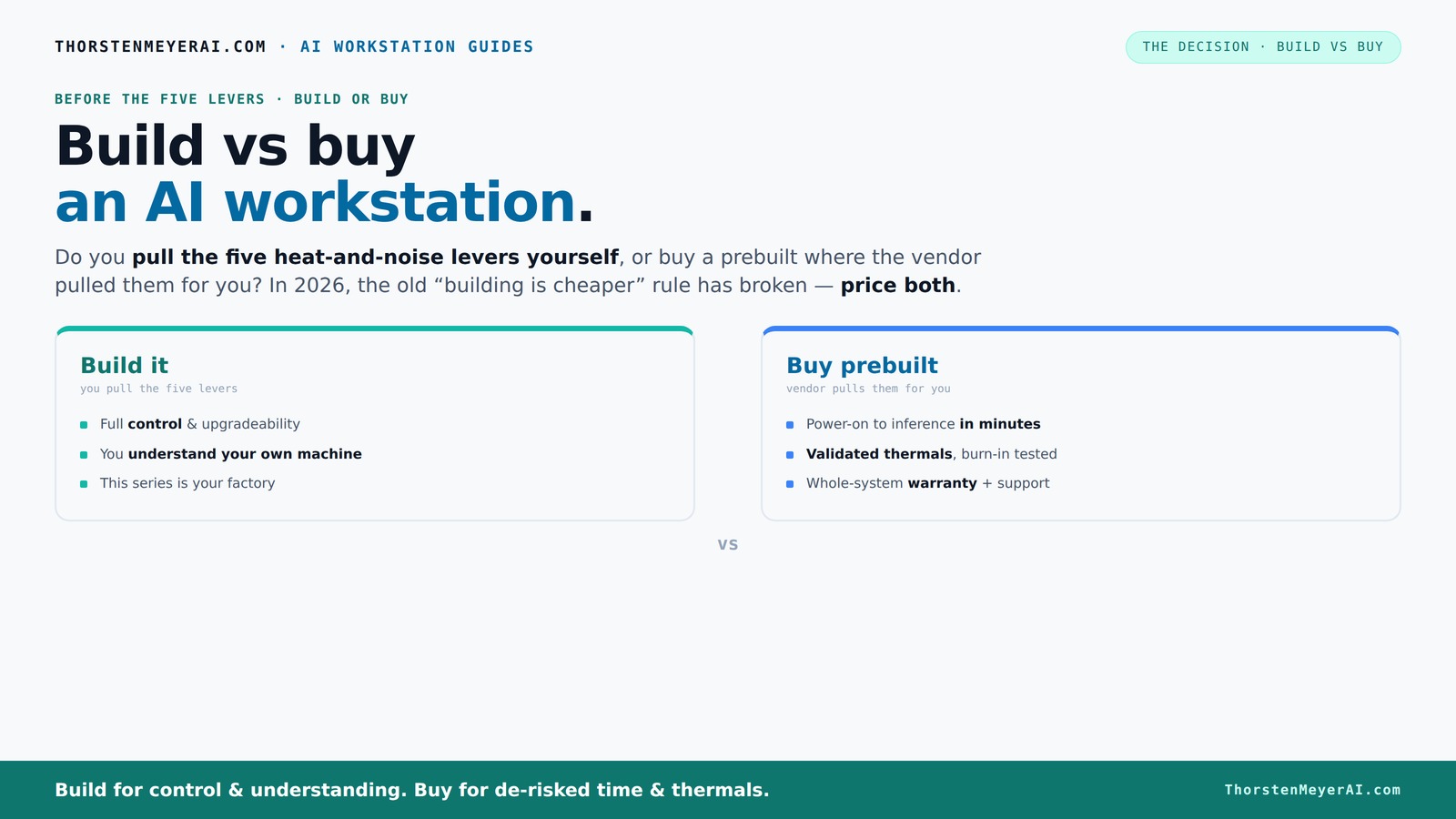
Build vs buy
an AI workstation.
The real question behind this whole series: do you pull the five heat-and-noise levers yourself, or buy a prebuilt where the vendor pulled them for you? And in 2026, the old “building is cheaper” rule has broken. Match your situation in Part 3.
Key Takeaways
- Component shortages in 2026 have flattened or reversed the cost advantage of DIY builds over prebuilt systems.
- Prebuilt workstations often include validated thermals, noise reduction, and warranties, saving time and reducing risk.
- Building your own system offers ultimate control and customization but demands time, expertise, and patience.
- A hybrid approach combines the speed of buying with the control of building, ideal for organizations focused on software or data differentiation.
- Always compare total cost of ownership over 3 years — hidden labor, downtime, and support costs can outweigh initial prices.
As an affiliate, we earn on qualifying purchases.
Why 2026 Changed Everything About Cost and Speed
Building your own AI workstation used to be the obvious cost-saver. But today, component shortages and bulk purchases have driven prices for GPUs, RAM, and SSDs up. For example, a high-end GPU that used to cost around $1,000 now often hits $1,400 or more.
Meanwhile, prebuilt vendors — like Lambda, Puget, and BIZON — bought parts early, locking in lower prices. They pass some savings to you, often matching or beating DIY costs. Plus, they validate thermals and stability before shipping, saving you hours of tuning and testing.
This shift turns the traditional build-vs-buy math on its head. Now, you need to compare actual prices for your specific setup today, rather than assuming DIY is always cheaper. The implication is that the long-held belief that building is cheaper no longer applies universally. Instead, you should evaluate based on current market conditions and specific needs. This also highlights that the perceived savings from DIY may be offset by additional time and effort, which can be costly in itself.
As an affiliate, we earn on qualifying purchases.
Who Pulls the Levers? Build or Buy for Heat, Noise, and Reliability
Making an AI workstation run cool and quiet is a balancing act. You can do it yourself or buy a prebuilt where the vendor handles it. The key is the five levers: undervolting the GPU, matching cooling, optimizing airflow, tuning fans, and strategic placement. For more on optimizing airflow and cooling, see this guide.
Buy a prebuilt → the vendor pulls these levers, testing under load before shipping. They often include water cooling, which keeps noise levels low and temperatures in check. For instance, Lambda’s systems claim up to 30% lower noise and temperature than DIY setups. You can learn more about high-performance prebuilt systems at this site.
Build it yourself → you’re the one tuning everything. You choose a quiet GPU ([see here](https://thorstenmeyerai.com/quiet-gpus-local-ai/)), pick a case ([like this](https://thorstenmeyerai.com/low-noise-pc-cases-airflow/)), and set the fans ([see setup tips](https://thorstenmeyerai.com/quiet-case-fans-airflow-setup/)). It’s more effort but gives you precise control. The tradeoff here is that DIY tuning requires expertise and time, and if not done correctly, can lead to overheating, loud operation, or system instability. Conversely, prebuilt systems that have been validated under load reduce these risks, ensuring consistent thermal performance and quieter operation, which is crucial for long-term reliability and user comfort.
As an affiliate, we earn on qualifying purchases.
When Buying Is the Clear Winner
If quick deployment, proven thermals, and hassle-free support matter, buying a prebuilt makes sense. For example, a research lab needing to start training models in a week benefits from systems like BIZON’s validated, tested machines with warranties. Discover more about reliable AI hardware options at askthebests.com.
Plus, multi-GPU setups are tricky. Vendors like Lambda offer systems designed for high-end, multi-GPU workloads with robust cooling and power delivery, reducing your risk of throttling or failure. The implication here is that prebuilt systems not only save time but also mitigate risks associated with complex configurations, which can be costly or damaging if mishandled. For organizations with tight deadlines or limited technical staff, these benefits translate into faster project start times and more predictable performance.
And if your budget or timeline is tight, the current market favors buying, especially when prices for parts spike. Sometimes, a prebuilt costs the same or less than sourcing and assembling your own, especially when you factor in troubleshooting and support costs. This emphasizes that the total cost of ownership includes not just initial hardware costs but also the hidden expenses related to setup, maintenance, and potential downtime, making prebuilt options often more economical in real-world scenarios.
As an affiliate, we earn on qualifying purchases.
When Building Your Own Machine Still Pays Off
If you’re a hobbyist, student, or small team with time to spare, building your own AI workstation can be rewarding. You control every component and tune the system to your exact needs. Plus, it’s often cheaper if you already have some skills and patience. For tips on building your own AI workstation, see this guide.
For example, you could select a quiet GPU ([see options here](https://thorstenmeyerai.com/quiet-gpus-local-ai/)), undervolt it ([see guide](https://thorstenmeyerai.com/undervolt-gpu-local-inference/)), and pick a case with noise-dampening features ([see options](https://thorstenmeyerai.com/low-noise-pc-cases-airflow/)). It’s a hands-on process, but you learn a lot and can upgrade at your own pace. The tradeoff is that DIY builds require significant time investment for sourcing parts, assembly, and thermal tuning, which can delay your start. If immediate productivity is critical, this could be a drawback. However, for those who value learning and customization, the long-term benefits include tailored performance and potential cost savings, especially if you already possess some technical skills.
The Hybrid Approach: Buy the Platform, Build the Differentiator
Many organizations now opt for a hybrid strategy: purchase a solid, validated platform and customize the software, cooling, or storage. This approach saves time and offers control where it counts. For example, a startup might buy a prebuilt system and then add custom software layers or data pipelines tailored to their niche.
This method balances speed with control. You avoid the long lead times of a full build but still tailor the system to your needs. The implication is that this approach allows organizations to quickly deploy reliable hardware while maintaining flexibility to innovate through software and data customization. It’s especially advantageous when hardware isn’t the core differentiator but rather a foundation for specialized software solutions.
In essence, buy the foundational parts, and build only the parts that create competitive advantage.
Decision Checklist: Which Path Fits Your Needs?
- How quickly do you need the system running? Buy if speed is top priority.
- Are you comfortable tuning and troubleshooting hardware? Build if yes.
- Is long-term control and upgradeability crucial? Build.
- Do you want a guaranteed support and warranty? Buy.
- Is your workload highly specialized or unusual? Build.
- Are your skills or time limited? Buy.
Frequently Asked Questions
Is it cheaper to build or buy a prebuilt AI workstation?
In 2026, component shortages and bulk buying have made prebuilt systems often cost the same or less than DIY builds. Always compare prices for your exact specs, including support and warranties, before deciding.How much performance do I lose by buying prebuilt?
Prebuilts are usually optimized for thermal performance and stability, often matching or exceeding DIY setups, especially when vendor validation and water cooling are involved. The key is that prebuilt systems are tested under load, ensuring consistent performance and reliability. While some highly customized DIY systems might eke out marginal gains, the real-world benefits of prebuilt systems—such as reduced thermal throttling and quieter operation—often outweigh these tiny performance differences. This means you get a dependable, optimized system without the extensive tuning required for DIY builds, which is especially important for AI workloads that demand stability and sustained performance.What hidden costs come with a custom build?
Hidden costs include labor for sourcing parts, assembly, thermal tuning, troubleshooting, potential downtime, and long-term support. These can add up to more than the initial price difference. For example, troubleshooting thermal issues or instability can take hours or days, delaying your project and increasing costs. Additionally, if you lack in-house expertise, hiring external help or investing time in learning can further inflate the total cost. Over time, support and warranty costs may also be higher if your DIY system encounters hardware failures or compatibility issues. Therefore, it’s crucial to factor these hidden expenses into your decision, as they can significantly impact the total cost of ownership over the system’s lifespan.When does a custom build make sense for AI workloads?
If your workload is highly specialized, requires unique hardware, or if you want maximum control over upgrades and security, building your own makes sense. For example, if you need custom cooling solutions for high-density GPU arrays or specific hardware configurations not available prebuilt, a DIY approach offers the flexibility to tailor the system precisely. It’s also beneficial if you prioritize learning about hardware, want to optimize every component, or plan to upgrade over time without vendor restrictions. However, keep in mind that the time and effort required can delay deployment, so if rapid deployment is critical, a prebuilt might be preferable. Ultimately, the decision hinges on balancing the need for customization against the urgency of your project.How do I compare TCO over 3 years, not just day-one price?
Factor in support costs, potential downtime, upgrade expenses, and labor for maintenance. Prebuilts often include warranties and support, which can lower long-term costs despite higher upfront prices. For example, a cheaper DIY system might require frequent repairs, thermal management, or component replacements, increasing total costs. Conversely, prebuilt systems typically come with support contracts, reducing unexpected expenses and downtime. To accurately compare TCO, calculate the initial purchase price, add estimated support and maintenance costs, account for potential downtime costs, and consider upgrade expenses over three years. This comprehensive view helps you understand the true financial impact and make a more informed decision.Conclusion
In 2026, the choice between build and buy isn’t just about price. It’s about your timeline, expertise, and long-term goals. If you need a ready-to-run, supported system fast — buying is often the smarter move.
But if control, customization, and learning matter more, building your own can pay off over time. The smart play? Evaluate your needs carefully, then pick the path that aligns best with your goals. Either way, your AI journey just got a lot more strategic.
NFL season / tailgating Picks
team gear
As an affiliate, we earn on qualifying purchases.