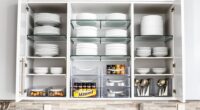
To organize important documents in a small apartment, create a dedicated filing system using labeled folders or small boxes for physical items like birth certificates and passports, and store them in a discreet, secure location. Digitize essential papers by scanning and saving them with strong passwords on cloud or external drives. Regularly review and purge outdated files to prevent clutter. Maintaining a balance between digital security and physical safety keeps everything easy to find and protected—more tips await to optimize your setup.
Key Takeaways
- Use labeled, compact storage containers or filing boxes to maximize space and maintain organization.
- Digitize essential documents and store them securely on encrypted cloud services for quick access.
- Keep only necessary papers, regularly purging outdated or duplicate files to reduce clutter.
- Assign a specific, discreet location for physical documents like passports and legal papers.
- Incorporate digital organization techniques, such as categorizing files into folders for easy retrieval.

Keeping your important documents organized is essential for quick access and peace of mind. In a small apartment, space is limited, so managing your files efficiently becomes even more critical. One of the best ways to achieve this is through digital filing. Instead of cluttering your limited physical space with stacks of papers, you can scan essential documents and store them securely on your computer or a cloud service. Digital filing helps you keep everything in one easily accessible location, reducing the risk of losing important papers and saving space. Plus, it allows you to organize files into folders or categories, such as insurance, banking, or medical records, making it simple to find what you need in seconds.
Efficient digital filing keeps your documents organized, accessible, and space-saving in small apartments.
However, while digital filing offers convenience, it’s equally vital to prioritize document security. You should use strong passwords and encryption for sensitive files, especially if you’re storing them online. Investing in reputable security software can help prevent unauthorized access or cyber threats. For added security, consider backing up your digital files regularly on an external hard drive or a secure cloud service. This way, even if your device is lost or damaged, your important documents remain safe and accessible. Balancing digital filing with physical document security is crucial. Keep the originals of essential documents—like birth certificates, passports, or wills—in a fireproof safe or a lockable file cabinet. Be sure to keep these in a discreet, secure location, so they’re protected from theft, damage, or accidental loss.
In a small apartment, managing physical documents requires discipline and a system that promotes easy retrieval. Use labeled folders or small filing boxes, and dedicate a specific spot for these files. Keep only what’s necessary, and regularly review and purge outdated papers to prevent clutter. For documents that don’t need to be kept physically, discard or scan them to free up space. Remember, the goal isn’t just to store documents but to organize them in a way that minimizes stress and maximizes efficiency. Incorporating digital organization techniques can further streamline your filing system and improve overall access.
Ultimately, combining digital filing with proper physical document security creates a streamlined system that fits even the tightest spaces. Your goal should be to make your important documents easy to find while keeping them protected from harm. Regularly updating your filing system and maintaining good security practices will ensure you can access anything you need quickly, without sacrificing safety or space. With a little effort, your small apartment can be a model of organization, giving you peace of mind and more room for the things that truly matter.

Sweetcrispy 2 Drawer Filing Cabinet Black, Rolling Wood File Cabinets with Printer Stand Under Desk Storage Lockable Wheels, Home Office Organizer
Ample Storage Space: Features 2 spacious drawers that provide generous room for files, notebooks, printers paper, and office…
As an affiliate, we earn on qualifying purchases.
As an affiliate, we earn on qualifying purchases.
Frequently Asked Questions
How Often Should I Update My Document Organization System?
You should update your document organization system at least once a year or whenever your document categorization needs change. Regular updates make sure labels stay relevant and help you spot outdated or missing files. Use label customization to keep categories clear and intuitive. When you experience major life changes, like moving or new financial accounts, revisit your system promptly to maintain order and easy access.
What Are the Best Security Measures for Sensitive Documents?
To secure sensitive documents, you should store digital backups in a secure cloud service or external drive. Keep physical copies in a fireproof, waterproof safe or a safe deposit box at your bank. Limit access to trusted individuals, and regularly update your security measures. Combining digital backups with a safe deposit guarantees your important documents stay protected from theft, damage, or loss, giving you peace of mind.
How Do I Handle Digital vs. Physical Document Storage?
You should store digital documents securely in cloud storage with strong passwords and two-factor authentication. For physical documents, keep only essential papers and regularly use paper shredding for outdated or sensitive items. This way, you minimize clutter, protect your information, and guarantee easy access. Balancing digital and physical storage helps keep your small apartment organized while safeguarding your important documents effectively.
What Items Should I Keep in a Fireproof Safe?
Think of your fireproof safe as your personal treasure chest. You should keep essential document storage items like birth certificates, passports, wills, and insurance policies inside. Also, include digital backups on a USB drive or external hard drive. Fireproof safe contents should protect what’s irreplaceable, giving you peace of mind. Prioritize items that hold sentimental, legal, or financial value, ensuring quick access during emergencies.
How Can I Organize Documents for Easy Access During Emergencies?
To organize your documents for easy access during emergencies, create a label system so you can quickly find what you need. Keep physical copies in a fireproof safe and make digital backups stored securely online or on a cloud service. Regularly update both sets to guarantee they’re current. Practice accessing your files quickly, so you’re prepared when time matters most.

Epson WorkForce ES-50 Portable Sheet-Fed Document Scanner for PC and Mac
Fastest and lightest mobile single sheet fed document scanner in its class(1) small, portable scanner ideal for easy,…
As an affiliate, we earn on qualifying purchases.
As an affiliate, we earn on qualifying purchases.
Conclusion
Remember, a cluttered space can lead to a cluttered mind. Keep your important documents organized and easily accessible, so you’re never caught off guard. Use a designated file or safe spot, and regularly review and update your files. As the saying goes, “A place for everything, and everything in its place.” Staying organized not only simplifies your life but also provides peace of mind whenever you need those vital papers.
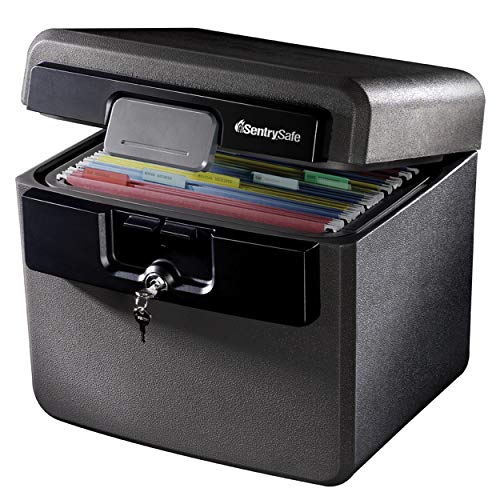
SentrySafe Black Fireproof and Waterproof Safe, File Folder and Document Box with Key Lock, Ex. 14.3 x 15.5 x 13.5 inches, HD4100
FIREPROOF: Safe is UL Classified to endure 1/2 hour at 1550°F and keep interior temperatures safe for irreplaceable…
As an affiliate, we earn on qualifying purchases.
As an affiliate, we earn on qualifying purchases.

SSK 4TB Personal Cloud Network Attached Storage Support Wireless Remote Access, Home Office NAS Storage with 4T Hard Drive Included for Phone, Tablet, Laptop Auto-Backup, Wired Ethernet Only,No WiFi
Your personal cloud storage with 4TB large capacity doesn't have own WIF: This NAS built-in 3.5inch 4TB storage,…
As an affiliate, we earn on qualifying purchases.
As an affiliate, we earn on qualifying purchases.